- English
- Español
- Português
- русский
- Français
- 日本語
- Deutsch
- tiếng Việt
- Italiano
- Nederlands
- ภาษาไทย
- Polski
- 한국어
- Svenska
- magyar
- Malay
- বাংলা ভাষার
- Dansk
- Suomi
- हिन्दी
- 繁体中文
- العربية
- Indonesia
- فارسی
- Eesti Keel
- Srpski језик
- Afrikaans
- icelandic
- беларускі
- Hrvatski
- ភាសាខ្មែរ
- ქართული
- Maori
- Тоҷикӣ
- O'zbek
- Հայերեն
- Lietuvos
- שפה עברית
- Pilipino
- Türkçe
- Gaeilge
- Norsk
- český
- ελληνικά
- український
- български
- ລາວ
- Latine
- Қазақша
- Slovenský jazyk

Why Choose a 4 Mic and Line Inputs Dante Interface?
In today’s professional audio world, choosing the right interface can make or break your setup. A 4 Mic and Line Inputs Dante Interface offers both flexibility and performance, bridging traditional analog sources with cutting-edge digital networking. In this article, we explore everything you need to know about this audio interface, its applications, and why Shenzhen FHB Audio Technology Co., Ltd. has become a trusted name in the industry.
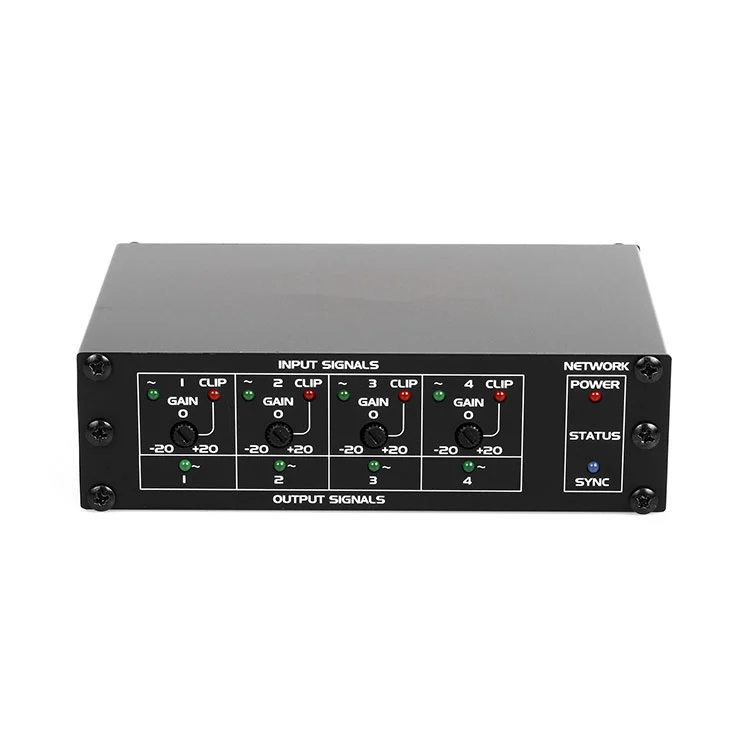
Table of Contents
- Overview of 4 Mic and Line Inputs Dante Interface
- Key Benefits for Audio Professionals
- Technical Specifications Explained
- How to Set Up Your Dante Interface
- 4 Mic and Line Inputs vs Other Interfaces
- Practical Use Cases
- Troubleshooting Common Issues
- Frequently Asked Questions
- Conclusion & Contact
Overview of 4 Mic and Line Inputs Dante Interface
A 4 Mic and Line Inputs Dante Interface is designed to accept up to four microphone or line-level sources and transmit them over a Dante network. This technology allows multiple audio channels to be transported via standard Ethernet cables with minimal latency, which is ideal for live sound, studio recording, and broadcast applications.
Shenzhen FHB Audio Technology Co., Ltd. specializes in producing high-quality Dante interfaces that combine reliability with professional-grade audio quality. Their devices often feature:
- Low-noise preamps for microphones
- High-resolution AD/DA conversion
- Flexible routing via Dante Controller software
- Robust build suitable for touring and studio environments
Key Benefits for Audio Professionals
Investing in a 4 Mic and Line Inputs Dante Interface provides numerous advantages over traditional analog interfaces:
- Scalable Audio Network: Easily expand your system without complicated cabling.
- Minimal Latency: Ensure real-time audio transmission critical for live events.
- High Audio Quality: 24-bit/48kHz or higher ensures crystal-clear sound reproduction.
- Remote Control: Adjust input gain, routing, and monitoring over the network.
- Reliability: Industrial-grade components reduce failure rates during high-demand usage.
Technical Specifications Explained
| Feature | Specification | Benefit |
|---|---|---|
| Mic Inputs | 4 XLR with phantom power | Supports condenser microphones and high-quality vocal capture |
| Line Inputs | 4 TRS balanced | Flexible connection for instruments, mixers, or other line-level sources |
| Dante Channels | Up to 8 simultaneous | High channel density over a single Ethernet cable |
| Sample Rate | 44.1kHz / 48kHz | Professional audio standard for recording and live streaming |
| Network | Gigabit Ethernet | Low-latency, high-bandwidth audio transport |
How to Set Up Your Dante Interface
Setting up a 4 Mic and Line Inputs Dante Interface is straightforward. Shenzhen FHB Audio Technology Co., Ltd. provides detailed manuals, but the general steps are:
- Connect microphones or line-level devices to the XLR/TRS inputs.
- Plug the interface into your Dante-enabled network using an Ethernet cable.
- Launch Dante Controller software on your computer.
- Assign input channels to desired outputs on your network.
- Adjust preamp gain and monitor levels for optimal audio performance.
Optional accessories such as rack ears or desktop stands can further optimize your setup for studio or live environments.
4 Mic and Line Inputs vs Other Interfaces
Here is a quick comparison to understand why a Dante interface stands out:
| Feature | Analog Interface | Dante Interface |
|---|---|---|
| Cabling | Multiple XLR and TRS cables | Single Ethernet cable carries multiple channels |
| Latency | High in long cable runs | Low (<1 ms) |
| Scalability | Limited by physical inputs | Expandable across network |
| Remote Control | None or minimal | Full channel control via software |
Practical Use Cases
A 4 Mic and Line Inputs Dante Interface can be used in a variety of scenarios:
- Live Concerts: Multiple microphones for vocals and instruments, integrated with a networked mixing system.
- Recording Studios: Efficient routing of microphones and line inputs to DAWs.
- Broadcast: Low-latency, high-quality audio for newsrooms and online streaming.
- Conference Rooms: Easy expansion for multiple speakers and presentation microphones.
- Educational Institutions: Lecture capture with multiple microphone sources.
Troubleshooting Common Issues
Even the best interfaces can run into issues. Here are some tips:
- No Sound: Check phantom power, input gain, and Dante routing.
- Latency Issues: Ensure network switches are gigabit and Dante-enabled.
- Channel Dropouts: Verify cable integrity and minimize network traffic from non-audio devices.
- Software Not Detecting Interface: Update Dante Controller and firmware.
Frequently Asked Questions
1. Can I use all 4 mic inputs simultaneously?
Yes, all four mic inputs can operate simultaneously with full phantom power support. Shenzhen FHB Audio Technology Co., Ltd. designs interfaces to handle multiple high-quality channels without degradation.
2. Does it support line-level instruments like keyboards?
Absolutely. The interface provides TRS line inputs compatible with keyboards, mixers, and other line-level devices.
3. Is Dante compatible with other networked audio devices?
Yes, Dante is an industry-standard protocol. Your 4 Mic and Line Inputs Dante Interface can interconnect with other Dante-enabled mixers, speakers, and recorders seamlessly.
4. How far can I run the Ethernet cable?
Standard Cat5e or Cat6 cables can run up to 100 meters without signal degradation. For longer runs, consider fiber solutions.
Conclusion & Contact
A 4 Mic and Line Inputs Dante Interface is an investment in flexibility, scalability, and professional audio quality. Whether for live sound, studio recording, or broadcast, it simplifies workflows and ensures top-tier audio performance. Shenzhen FHB Audio Technology Co., Ltd. provides reliable, high-quality devices that have been trusted by audio professionals worldwide.
Ready to elevate your audio setup? Contact us today to learn more about our Dante interfaces and how they can meet your professional audio needs.